Showing posts with label sample. Show all posts

Sunday, 10 March 2013

PLSQL - Decoding time

 PL SQL Decode Function

Some of my friends told me to write something about famous decode :)
So here it goes ....

What is decode?

Decode is implemented function that has the functionality of an IF THEN ELSE statement.
But there is one major difference between implementing these two functionality. DECODE can only work in select statement.You need to have in mind that DECODE is supported only in SQL Context so you don't really working with PL code. More flexible than decode is case statement....
The syntax for the decode function is: decode( expression , search , result [, search , result]... [, default] )
expression is the value to compare.

search is the value that is compared against expression.

result is the value returned, if expression is equal to search.

default is optional. If no matches are found, the decode will return default. If default is omitted, then the decode statement will return null (if no matches are found).


So something to decode now....
 let's create some table


CREATE
   TABLE company
   (
      id            NUMBER(32) NOT NULL,
      company_id    NUMBER(8),
      owner_name    VARCHAR2(20 byte),
      street_adress VARCHAR2(20 byte)
   );

insert some data in it

   insert into company values (1,10001,'Nerad Kovacevic','Neradna BB');
   insert into company values (2,10003,'Vedran Rudjic','Shvalerska 22');
   insert into company values (3,10006,'Ljuban Draga','Vlak u snijegu bb');

select * from company;

you will get 


let's say 10001 is IBM company's id, 10003 is Microsoft and 10006 is TrainStation Co :)

and now we want to display some writings instead of company id's so we decode it
Pseudo-code; if i found id by the number of 10001 i will write 'IBM' if that number is 10003 i will write 'Microsoft' if that number is 10006 i will write 'TrainStation Co' if i don't find (ELSE) number that i have in my decode function i will write 'Nameless'
select decode(company_id,10001,'IBM',10003,'Microsoft',10006,'Trainstation Co','Nameless') as company_name , owner_name, street_adress from company;

after running statement we get;
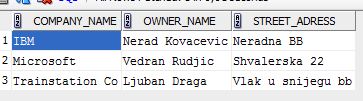


Lets insert one more row...


insert into company values (3,10009,'Unknown','UNKNOWN bb'); 

and run our statement again and for every undefined id we will get Nameless in company name column...

select decode(company_id,10001,'IBM',10003,'Microsoft',10006,'Trainstation Co','Nameless') as company_name , owner_name, street_adress from company;


So that's about it...

Simple decode function....

Anyway you can find it useful in many occasions and it's use is quite simple and in many situations very grateful...

so one last example

 select decode((select id from company where id = 1 ),1,'IBM',2,'Microsoft',3,'Trainstation Co','Nameless') as company_name , owner_name, street_adress from company where rownum < 2;


Happy decoding :D

Friday, 8 March 2013

PLSQL check my email adress...

PL SQL Code for checking mail adress

So you want to put some security check on you're mail input field...
As you know mail can consist letters, numbers and dots....
It must contain only one @ sign...
How would you check you're email?


I do check on two different ways
No1.

Simple way of checking allowed signs in mail

function f_emailok (i_email in varchar2) return boolean is
  l_dot    NUMBER;
  l_at     NUMBER;
  l_length NUMBER;
BEGIN
  l_dot    := instr(i_email ,'.');
  l_at     := instr(i_email,'@');
  l_length := length(i_email);
  IF ((l_dot = 0) OR (l_at = 0) OR (l_dot = l_at + 1) OR
     (l_at = 1) OR (l_at = l_length) OR (l_dot = l_length))
  then
    RETURN (false);
  end if;
  IF instr(substr(i_email,l_at),'.') = 0 then
    RETURN (false);
  end if;
  return (true);
END f_emailok;

Let's explain code....

With instr function we are searching for sign in our string. In this case we search for . (dot), @ (at) and we are measuring length of our string input.
with 
   l_dot    := instr(i_email ,'.');
we get some numeric value in our l_dot variable.
let's say i_email is filled with value some.mail@gmail.com
l_dot will pick up value 5 from i_email input cause dot sign is on the fifth place in our string.
after we pick up @ value on 11th sign in string and length of  our string we can do some logic.
We say if value of l_dot is 0 or l_at = 0 or there is @ sign behind dot or @ sign is on the first place or there is all string filled with @ or with dots return false.

We still need one more check. Is there anything behind @ sign 
   instr(substr(i_email,l_at),'.') = 0
if value is zero return false...

If everything goes correctly we return true value.

But there is one bug in code :) you can pass email in incorrect format...
Figure out which and how to solve it...


No2.

Now we check email format with OWA pattern integrated function  

function f_emailok (i_email in varchar2) return boolean is
begin
         if owa_pattern.match(i_email,'\w{1,}[.,0-9,a-z,A-Z,_]\w{1,}\w{1,}[.,0-9,a-z,A-Z,_]\w{1,}'||
            '\@\w{1,}[.,0-9,a-z,A-Z,_]\w{1,}\.\w{1,}[.,0-9,a-z,A-Z,_]\w{1,}$') then
         return(true);
      else
         return(false);
      end if;
   exception
      when others then
      return(false);
END f_emailok;

So what does this code do?
It searches for allowed signs in our code....
we pass some string and in order with our owa patterns we search if it consists of illegal characters...
here is list of pattern  


PLSQL list of pattern

Assertions:

  • ^ Matches the beginning of a line (or string)
  • $ Matches the end of a line (or string)
  • Quantifiers:
  • {n,m} Must match at least n times, but not more than m times
  • {n,} Must match at least n times
  • {n} Must match exactly n times.
  • * 0 or more occurances
  • + 1 or more occurances
  • ? 0 or 1 occurance(s)

Legal atoms:

  • . matches any character except \n
  • A list of characters in square brackets [] is a class of characters,
  • for example [0-9] indicates match any character from 0 to 9.
  • \n matches newlines
  • \t matches tabs
  • \d matches digits [0-9]
  • \D matches non-digits [^0-9]
  • \w matches word characters (alphanumeric) [0-9a-z_A-Z]
  • \W matches non-word characters [^0-9a-z_A-Z]
  • \s matches whitespace characters [ \t\n]
  • \S matches non-whitespace characters [^ \t\n]
  • \b matches on “word” boundaries (between \w and \W)
  • A backslashed x followed by two hexadecimal digits, such as \x7f,matches the character having that hexadecimal value.

  • A backslashed 2 or 3 digit octal number such as \033 matches the character with the specified value.

  • Any other “backslashed” character matches itself.